This article contains affiliate links. If you sign up through our links, we may earn a commission at no extra cost to you. We only recommend tools we’ve evaluated thoroughly.
Quick Verdict
The most important question any make.com review should answer is whether it’s actually the right tool for your situation. It gives you a visual canvas to build multi-step, multi-branch workflows (called scenarios) connecting 3,000+ apps, with a credit-based pricing model that starts at $0 and stays cheaper than the competition at scale. The learning curve is real, but if you’re willing to invest a few hours upfront, the payoff is significant. It’s not the right tool for everyone — but for ops-focused small business owners and agencies, it’s one of the best values in automation today.
This make.com review covers everything you need to evaluate the platform — pricing, features, who it’s for, and how it stacks up against the alternatives. Start free on Make.com →
Table of Contents
The Problem Make.com Solves
You’re running your business across eight different tools — your CRM, your project management app, your email platform, your invoicing software, your calendar, your form builder — and none of them talk to each other without you in the middle. Every new lead triggers a manual copy-paste. Every closed deal means updating three different places by hand. Every client onboarding is a checklist you run yourself, every time.
That’s not a workflow problem. It’s a make.com review waiting to happen.
Make.com (formerly Integromat) is a visual automation platform that lets you connect your apps and build automated workflows without writing code. Where most automation tools chain actions together in a straight line, Make lets you build scenarios that branch, loop, filter, and respond to conditions — visually, on a drag-and-drop canvas. It’s what you reach for when your automations need to be smarter than “if this, then that.”
What Is Make.com?
Make.com launched as Integromat in 2012, built by a Czech software company. It rebranded to Make in 2022 under new ownership (Celonis acquired it). The platform has since grown into one of the most capable no-code automation tools available, sitting in a competitive tier between Zapier (simpler, more expensive) and n8n (more powerful, but self-hosted and more technical).
The core concept is the scenario — Make’s word for what other tools call a workflow or a zap. A scenario is a visual flowchart of connected modules, each representing an action in an app. You can see exactly what’s happening at every step, branch your logic with routers, loop through lists with iterators, and aggregate data before passing it downstream.
Make switched from an operations-based billing model to a credits-based model in August 2025, primarily to accommodate AI integrations that consume computing resources differently than standard app connections.
It’s used by freelancers, agencies, small businesses, and technical founders who want more control over their automations than simpler tools allow — without hiring a developer.
Make.com Pricing
Before diving into features, pricing is where this make.com review needs to start — because the credit model is the thing most new users get wrong..
| Plan | Price (Annual) | Credits/Month | Active Scenarios | Min. Run Interval | Key Extras |
|---|---|---|---|---|---|
| Free | $0 | 1,000 | 2 | 15 minutes | Visual builder, 3,000+ apps, routers & filters |
| Core | $9/mo | 10,000 | Unlimited | 1 minute | Make API access, increased data transfer |
| Pro | $16/mo | 10,000+ | Unlimited | 1 minute | Priority execution, custom variables, full-text log search |
| Teams | $29/mo | 10,000+ | Unlimited | 1 minute | Team roles, shared scenario templates |
| Enterprise | Custom | Custom | Unlimited | Custom | SSO, SCIM, audit logs, 24/7 support, SLA |
Credit scaling: On paid plans, you can increase your credit allocation using a slider on the pricing page. Make offers 20k, 40k, 80k, 150k, 300k credits/month and beyond — your monthly price adjusts accordingly. Higher tiers offer lower per-credit costs.
Rollover credits: Unused credits carry over to the following month on paid plans (introduced in 2026). This is a meaningful advantage for seasonal businesses or anyone with variable automation volume.
Extra credits: If you exceed your plan allocation, Make charges 25% above your per-credit plan rate for additional credits, whether purchased manually or via auto-purchasing. Upgrading to a higher credit tier is almost always more cost-efficient if you’re regularly hitting your limit.
One important nuance: Webhook triggers consume zero credits when idle — they only fire when data arrives. Polling triggers (where Make checks an app on a schedule) burn a credit on every check, whether or not new data exists. A polling trigger set to run every minute on a rarely-updated source can drain your credit balance fast. Wherever possible, use webhook-based triggers.
Annual billing saves 15% or more compared to monthly.
Make.com Features
Here’s what stood out in this make.com review when evaluating the platform’s core capabilities.
Visual Scenario Builder
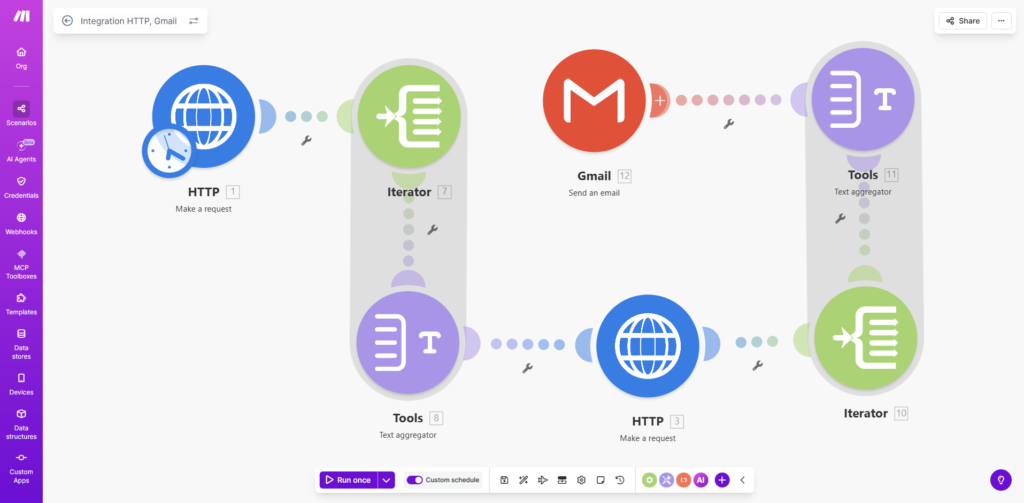
This is Make’s signature differentiator. Instead of a list of steps, you get an actual visual canvas. Every module sits as a node. Every connection between modules is a visible line. When you run a scenario, you can watch data flow through it in real time. For anyone who’s ever tried to debug a complex automation by scrolling through a text-based log, this is the tool you didn’t know you needed.
Routers and Conditional Logic
A router is Make’s way of splitting a scenario into multiple branches based on conditions you define. One incoming record might route to your CRM, trigger a Slack alert, and update a Google Sheet — all from a single trigger, with different filters applied at each branch. This is where Make leaves simple trigger-action tools behind.
Iterators and Aggregators
Iterators let you process arrays item by item — so if a scenario receives a list of 50 records, you can loop through each one and apply actions individually. Aggregators do the reverse — they collect individual items and bundle them back into a single output. These two features unlock a category of automations that most other tools simply can’t handle without code.
Webhooks and HTTP Modules
Make gives you native webhook support and a built-in HTTP module that lets you connect to any API — even ones without a pre-built Make integration. If you can send an HTTP request to it, you can automate it in Make. This significantly extends the platform’s reach beyond its 3,000+ official integrations.
AI Integrations
Make has native modules for OpenAI, Anthropic’s Claude, Google Gemini, and other AI providers. As of November 2025, all paid plan users can connect their own API key directly to any AI provider — you pay your AI provider directly for token usage rather than consuming Make credits on AI calls. This makes AI-powered automations more cost-transparent than they were on older plans.
3,000+ App Integrations
Make’s integration library covers most tools a small business runs — CRMs, email platforms, project management tools, e-commerce platforms, Google Workspace, Microsoft 365, Slack, and more. It’s smaller than Zapier’s 8,000+ library, but covers the core stack most small businesses use. The HTTP module fills gaps for anything not natively supported.
Real-Time Execution Monitoring
Every scenario run is logged with step-by-step data. You can see exactly what inputs entered each module and what outputs came out. When something breaks, you know precisely where and why — no guesswork.
Error Handling
Make lets you build error handlers directly into your scenarios. If a module fails, you can route the error to a separate path — log it, send an alert, retry, or skip and continue. This is what separates production-grade automation from hobbyist automations that break silently.
Who Make.com Is For
Make.com is the right fit for:
- Small business owners who’ve outgrown Zapier — specifically those hitting credit or step limits, paying for premium tiers they don’t need, or building automations with more than 2-3 conditions
- Agencies building automations for clients — the visual canvas makes scenarios easier to explain, document, and hand off
- Ops-focused solopreneurs — founders who run lean and want to automate heavily without a technical hire
- Technical founders and developers — Make’s HTTP modules, webhooks, and JSON handling feel native to someone with a software background
- Businesses running AI-powered workflows — the native AI modules and bring-your-own-API-key model make this a strong platform for AI-augmented automations
Make.com is probably not the right fit for:
- Complete non-technical beginners — if you’ve never thought about conditions, data types, or API calls, Make’s learning curve will frustrate you before it helps you. Start with Zapier.
- High-volume enterprise — at serious scale, evaluate n8n (self-hosted, lower per-operation cost) or Workato alongside Make
- Businesses with highly niche app stacks — if your tools aren’t among Make’s 3,000+ integrations and don’t support webhooks or APIs, you’ll hit walls quickly
Pros and Cons
After hands-on evaluation for this make.com review, here’s the honest breakdown.
Pros
- Visual canvas makes complex logic buildable — multi-branch scenarios with routers, iterators, and aggregators are native features, not workarounds
- Dramatically cheaper than Zapier at scale — 10,000 credits for $9/month vs. Zapier’s 750 tasks for $19.99. The gap widens significantly as volume grows
- Webhook triggers burn zero credits when idle — your scenarios don’t cost money when nothing’s happening
- Native AI modules for OpenAI, Claude, and Gemini — with bring-your-own-API-key support on all paid plans as of late 2025
- Real-time execution monitoring — step-by-step data flow visibility makes debugging fast and concrete
- Rollover credits on paid plans — unused credits carry forward month to month (2026 feature), which matters for businesses with variable automation volume
- Active community — 50,000+ members in Make’s community forum, with employees regularly participating
Cons
- Steeper learning curve than Zapier — expect 2-4 hours before you feel confident building multi-step scenarios; iterators and aggregators take longer
- Polling triggers burn credits constantly — if you set up a polling trigger on a slow source, you’ll drain your balance faster than expected. Webhook-first is the right habit, but it takes intentional setup
- Credit math demands attention — unlike Zapier’s task-based model, you’re counting steps across every module in every run. Complex scenarios with loops can consume credits faster than new users expect
- Fewer native integrations than Zapier — 3,000+ vs. Zapier’s 8,000+. The HTTP module covers most gaps, but it requires more setup
- Live chat support only on Teams and Enterprise — Core and Pro users are on email tickets, which typically resolve in 12-24 hours but isn’t instant
A Real Example: How I Automate My Own SEO Reporting
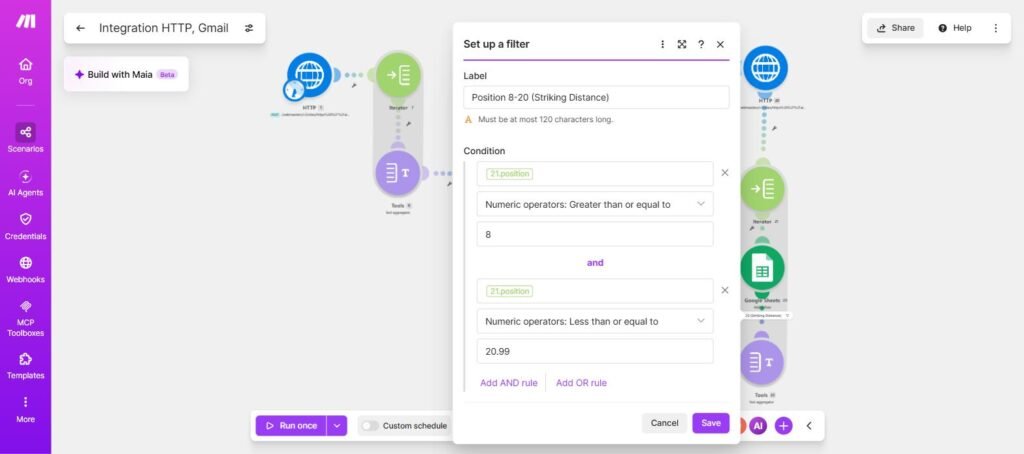
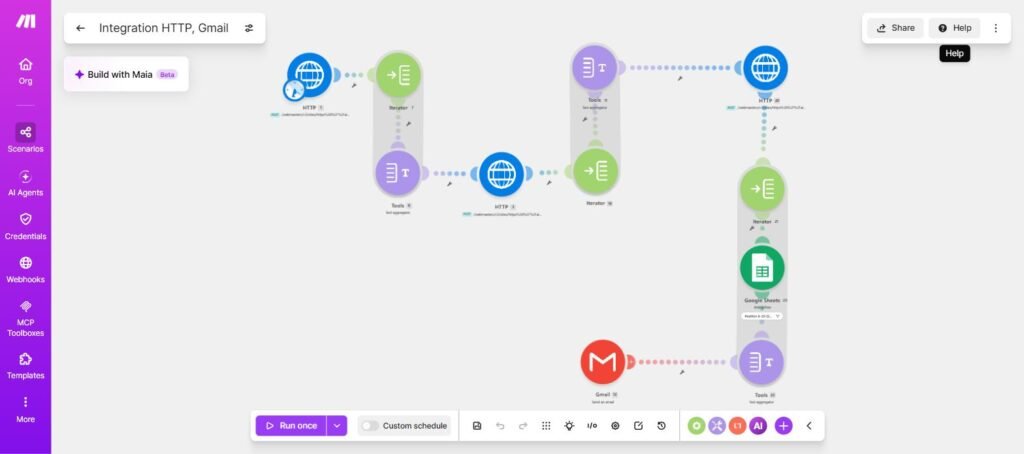
I use Make.com to run this site’s own SEO reporting — no logging into Search Console required. Every Monday at 7am, a scenario pulls my top pages and queries from the GSC API, flags anything sitting in “striking distance” (position 8–20, the sweet spot where a few backlinks can push a page onto page 1), logs the full dataset to a tracking sheet, and emails me a formatted digest.
The striking-distance filter is the piece worth stealing — two conditions applied to a 250-row GSC pull before it ever reaches my inbox, no manual sorting through Search Console’s UI:
Here’s the full canvas — two GSC API pulls, a 250-row pull that feeds both the striking-distance filter and a running position-history log in Google Sheets, and a formatted email out the other end:
Here’s what actually landed in my inbox from the striking-distance section that week:
| Page | Impressions | Clicks | Position |
|---|---|---|---|
| /gohighlevel-vs-monday-crm/ | 43 | 0 | 17 |
| /make-com-review-for-small-business/ | 39 | 0 | 19 |
| /tidio-review-for-small-business/ | 5 | 0 | 21 |
If you’re already running your business across a stack of disconnected tools, this is the kind of thing Make.com is built for. Try Make.com free →
Make.com vs Competitors
Make vs Zapier
When doing a make.com review, the Zapier comparison is unavoidable — and for good reason. Zapier is simpler and has more native integrations. Make is more powerful and substantially cheaper at scale. The honest summary: Zapier is better for non-technical users who want automations running with minimal configuration. Make is better for technical users who need multi-branch logic and can’t justify Zapier’s pricing at higher volumes.

The credit model vs. task model is the key practical difference. Zapier charges per completed action. Make charges per module step. A 5-step scenario in Make consumes 5 credits per run; a similar Zapier automation counts as 1 task. At low volume with simple automations, Zapier can actually be cheaper. At moderate-to-high volume with complex logic, Make wins decisively.
We’ve covered this comparison in detail — see our Make vs Zapier for Small Business breakdown.
Make vs n8n

n8n is the tool technical users reach for when they’ve outgrown Make — or when they need to self-host for data privacy, compliance, or cost at very high volume. n8n is open source, self-hostable, and more flexible for developers. The tradeoff: setup requires more technical overhead, the ecosystem is smaller, and the polish of Make’s visual interface isn’t fully matched. For most small businesses, Make hits the right balance of power and accessibility. n8n is worth evaluating if you’re running thousands of scenario executions per day or have strict data residency requirements.
How to Get Started with Make.com
If this make.com review has you ready to test the platform, setup is straightforward.
Step 1: Create a free account Sign up at make.com — no credit card required. You get 1,000 credits/month and 2 active scenarios to start.
Step 2: Build your first scenario From the dashboard, click “Create a new scenario.” Add your trigger module first — the app and event that starts your automation. Then add action modules. Connect them visually by clicking the handle on the right side of each module.
Step 3: Map your data When you add a module, Make prompts you to map data fields from previous modules into the inputs. Click any field and select the output from an earlier step. This is the core of how Make works — data flows forward through your scenario as mapped variables.
Step 4: Add routers for conditional logic If your automation needs to take different actions based on conditions (this lead goes to CRM A, this one goes to CRM B), add a router after your trigger. Each router path gets its own filter conditions and downstream modules.
Step 5: Test before activating Use the “Run once” button to test your scenario with real data before turning it on. Watch the execution results to confirm each module is receiving and outputting the right data. Once you’re satisfied, toggle the scenario to “On” and set your run schedule.
For more complex automations worth building, see our Best AI Operations & Workflow Tools guide and our tutorial on How to Automate Customer Support with AI.
FAQ
What is Make.com?
Make.com (formerly Integromat) is a visual workflow automation platform that lets you connect apps and automate tasks without code. You build “scenarios” — visual flowcharts of connected modules — that trigger automatically based on events or schedules. It supports 3,000+ app integrations and is widely used by small businesses, agencies, and technical founders. This make.com review focuses specifically on how the platform performs for small business use cases.
Is Make.com free?
Yes. Make offers a permanent free plan with 1,000 credits per month and 2 active scenarios. It’s enough to test the platform and run light automations, but not sufficient for most business use cases. Paid plans start at $9/month (billed annually) for 10,000 credits/month.
How does Make.com pricing work with credits?
Every module action in a scenario costs one credit. A 5-step scenario that runs 100 times per month consumes roughly 500 credits. AI-powered module actions may cost more depending on the operation. Webhook triggers consume zero credits when idle; polling triggers consume a credit on every check regardless of whether new data exists. Paid plans include rollover credits — unused credits carry forward to the following month.
Make.com vs Zapier — which is better?
This is the question every make.com review has to address directly. It depends on your technical comfort and automation volume. Zapier is easier to set up and has more native integrations (8,000+). Make is more powerful for complex logic and substantially cheaper at moderate-to-high volume — 10,000 credits for $9/month vs. Zapier’s 750 tasks for $19.99. For small business owners with non-trivial automation needs, Make wins on value. For true beginners, Zapier is more approachable. See our full Make vs Zapier comparison for a detailed breakdown.
Is Make.com good for small business?
Yes — with a caveat. Make is an excellent fit for small business owners who are comfortable with a learning curve and want to build sophisticated automations without hiring a developer. It’s especially strong for service businesses managing client workflows, lead routing, and multi-app integrations. It’s not ideal for owners who want dead-simple setup with no configuration overhead. That’s the core question this make.com review is designed to answer — and for the right owner, the answer is yes.
What apps does Make.com integrate with?
Make supports 3,000+ pre-built app integrations including Google Workspace, Microsoft 365, Slack, HubSpot, Salesforce, monday.com, ActiveCampaign, Shopify, Airtable, Notion, and most major tools small businesses use. For apps without a native integration, Make’s HTTP module lets you connect to any service with an API or webhook endpoint. It’s one of the stronger integration libraries you’ll find in any make.com review of automation tools at this price point.
What is a scenario in Make.com?
A scenario is Make’s term for an automated workflow. It’s a visual flowchart on a drag-and-drop canvas, made up of connected modules — each module represents one action in one app. Scenarios can branch with routers, loop with iterators, aggregate data, handle errors, and run on a schedule or in response to real-time events.
Does Make.com have AI features?
Yes. Make has native modules for OpenAI (GPT-4), Anthropic’s Claude, Google Gemini, and other AI providers. As of November 2025, all paid plan users can connect their own AI provider API key — so you pay your AI provider directly for token usage rather than burning Make credits. This makes AI-powered automations significantly more cost-efficient than they were on older plan structures. You can build content pipelines, AI triage systems, automated research workflows, and chatbot integrations directly in Make without writing code.
Verdict
This make.com review comes to a clear conclusion: Make earns a strong recommendation for small business owners who are ready to move beyond basic automation. If you’ve been on Zapier for a while and you’re either frustrated by the cost at scale or hitting the ceiling of what simple trigger-action automations can do, Make is the natural next step. The visual scenario builder is genuinely one of the best interfaces in the automation space — not just for building, but for understanding what your automations are actually doing at every step.
The learning curve is real, and it’s worth being honest about that. If you’ve never worked with conditional logic, iterators, or webhooks, expect to spend a few hours getting comfortable before you feel productive. The payoff is significant: automations that would require a developer in other tools are buildable in Make by a non-developer who’s willing to invest the time.
For home service businesses, agencies, and ops-focused founders, Make slots in cleanly as the automation backbone for your stack. We cover how to build that stack in our Best AI Tools for Home Service Businesses guide. The free plan is genuinely useful for testing — start there, map out two or three scenarios you’d actually automate, and you’ll know within a week whether Make is the right fit for your business.