Affiliate Disclosure: This site is supported by its readers. We may earn a commission when you purchase through our links at no extra cost to you. This helps us continue providing honest, detailed reviews of AI and automation tools for small business owners.
Quick Verdict: Zoho CRM vs Pipedrive
Pipedrive wins for pure sales teams that need visual pipeline management and intuitive deal tracking. It’s simpler, faster to learn, and purpose-built for closing deals.
Zoho CRM wins for growing businesses that need room to scale, deeper customization, and integration with a broader business ecosystem beyond just sales.
Bottom line: Choose Pipedrive if you’re laser-focused on sales velocity. Choose Zoho CRM if you need flexibility and plan to grow into marketing automation, customer service, and multi-department workflows.
Table of Contents
The Real Difference Between Zoho CRM vs Pipedrive
You’re comparing Zoho CRM vs Pipedrive because you need a CRM that actually helps your sales team close deals without turning into a data entry nightmare. Both systems promise to organize your contacts and track your pipeline, but they take fundamentally different approaches.
Pipedrive was built by salespeople who were frustrated with bloated CRMs. It’s a sales-first tool with a visual pipeline that makes deal progression obvious at a glance. You’ll be up and running in an afternoon, not a week.
Zoho CRM comes from a company that builds entire business suites. It offers deeper customization, more advanced automation, and connections to forty-plus other Zoho applications. You get more power, but also more complexity.
The choice isn’t about which CRM is “better” in the abstract. It’s about which philosophy matches your business reality right now. Do you need a focused sales tool that gets out of your way, or do you need a platform that can grow with you as your needs expand beyond simple deal tracking?
This comparison breaks down the practical differences that matter when you’re trying to manage customer relationships and hit revenue targets. No fluff, just the details you need to make an informed choice.
Why Compare These Two CRMs?
Zoho CRM and Pipedrive consistently land on the same shortlists for small business owners evaluating CRM software. Both offer affordable entry points, both have strong user bases, and both promise to solve the chaos of spreadsheet-based customer management. This zoho crm vs pipedrive breakdown cuts through the noise to show you exactly where each tool wins.
But they solve the problem differently, and that difference matters to your daily workflow.
Pipedrive appeals to teams that think visually. If your sales process involves moving deals through clear stages, Pipedrive’s kanban-style interface makes progress transparent. Your team sees exactly where each deal stands and what action comes next. It’s intuitive enough that new reps start using it productively within hours, not days.
Zoho CRM appeals to businesses that need more than just sales tracking. Maybe you want to connect your CRM to your email marketing. Maybe you need custom modules for project management or inventory tracking. Maybe you’re planning to add customer service ticketing next quarter. Zoho CRM gives you the building blocks to construct exactly the system you need.
The comparison matters because choosing wrong costs you money and momentum. Pick a tool that’s too simple, and you’ll outgrow it in six months. Pick one that’s too complex, and your team won’t use it consistently. Both scenarios hurt your close rates and waste the time you spent migrating data.
You’re comparing these specific tools because you want a CRM that balances capability with usability. You need something more robust than a basic contact manager but less overwhelming than enterprise software. Both Zoho CRM and Pipedrive occupy this middle ground, just from different angles.
Side-by-Side Comparison: Zoho CRM vs Pipedrive
| Feature | Zoho CRM | Pipedrive |
|---|---|---|
| Starting Price | $20/user/month ($14 billed annually) | $24/user/month (or $14 billed annually) |
| Free Plan | ✅ Up to 3 users | ❌ 14-day trial only |
| Visual Pipeline | ✅ Available | ✅ Core feature |
| Email Integration | ✅ Gmail, Outlook, Zoho Mail | ✅ Gmail, Outlook, others |
| Mobile App Quality | ⭐⭐⭐⭐ (4/5) | ⭐⭐⭐⭐⭐ (5/5) |
| Workflow Automation | ⭐⭐⭐⭐⭐ (5/5) Advanced | ⭐⭐⭐⭐ (4/5) Focused |
| Customization Depth | ⭐⭐⭐⭐⭐ (5/5) Extensive | ⭐⭐⭐ (3/5) Moderate |
| Ease of Setup | ⭐⭐⭐ (3/5) Requires planning | ⭐⭐⭐⭐⭐ (5/5) Fast onboarding |
| Built-in Phone | ✅ Via Zoho PhoneBridge | ✅ Via integrations |
| Reporting Flexibility | ⭐⭐⭐⭐⭐ (5/5) Highly customizable | ⭐⭐⭐⭐ (4/5) Strong visuals |
| Marketing Automation | ✅ Built-in journey builder | ❌ Requires Campaigns add-on |
| AI Features | ✅ Zia AI assistant | ✅ AI Sales Assistant |
| Native Integrations | 800+ apps | 400+ apps |
| API Access | ✅ All paid plans | ✅ All paid plans |
| Best For | Growing teams needing customization | Sales teams focused on deals |
⚠️ Pricing shown reflects rates at time of publication. SaaS pricing changes frequently — verify current pricing on each tool’s website before committing.
Zoho CRM: Complete Deep-Dive
Best For
Zoho CRM works best for small business owners who need flexibility more than simplicity. You’re planning for growth and want a system that won’t require replacement when you add marketing campaigns, customer service functions, or complex reporting requirements.
It’s ideal if you’re already using other Zoho applications or if you’re comfortable investing time upfront to configure a system that matches your exact processes. Technical founders and operations-minded business owners appreciate the depth.
Choose Zoho CRM if you need custom modules, multi-stage approval workflows, or territory management. It handles complexity that would break simpler tools.
Key Strengths
- Customization depth: You can create custom modules, fields, buttons, and layouts without writing code. The system adapts to your process instead of forcing you into predefined workflows.
- Workflow automation: Blueprint feature lets you map multi-step processes with conditional logic, approvals, and automated actions. You can automate lead nurturing sequences, deal progression rules, and follow-up tasks based on dozens of triggers.
- Zia AI assistant: Predicts deal closure probability, suggests optimal contact times, identifies anomalies in sales patterns, and automates data entry from business cards and emails.
- Omnichannel communication: Built-in email, phone, live chat, and social media integration. You track every customer interaction in one timeline without jumping between tools.
- Ecosystem integration: Native connections to Zoho Books, Zoho Campaigns, Zoho Desk, Zoho Analytics, and forty other Zoho applications. If you adopt the Zoho ecosystem, everything shares data seamlessly.
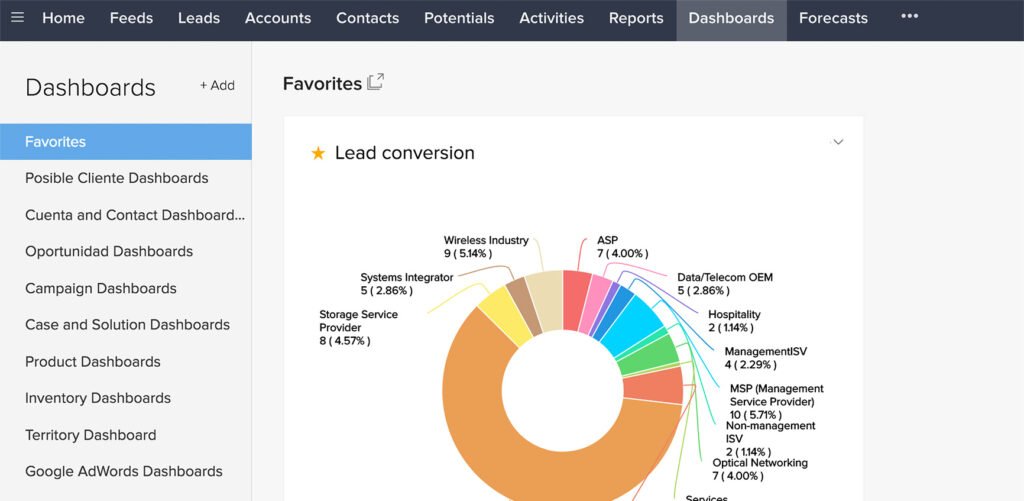
- Advanced analytics: Custom report builder with pivot tables, chart options, and scheduled delivery. Anomaly detection highlights unusual patterns automatically.
- Developer-friendly: Robust API, webhooks, and Deluge scripting language for custom functions. Technical teams can extend functionality far beyond standard features.
Limitations
- Steeper learning curve: All that customization power creates complexity. New users feel overwhelmed by options. Expect to spend days, not hours, getting comfortable with the interface.
- Inconsistent interface design: Some features feel dated. The UI lacks the polish of newer SaaS tools. Navigation isn’t always intuitive.
- Feature limitations on lower tiers: Many powerful features require Professional or Enterprise plans. The Standard plan feels restrictive compared to competitors at similar price points.
- Mobile app gaps: Mobile experience doesn’t match desktop functionality. Complex workflows become cumbersome on phones.
- Support quality varies: Response times and resolution quality depend heavily on your plan tier. Lower-tier plans get email support only, which can be slow.
Pricing Breakdown
Prices are accurate as of the date of this article but are subject to change. Always verify current pricing on the tool’s official pricing page before making a decision.
Zoho CRM offers five pricing tiers with annual billing discounts:
- Free: $0 for up to 3 users. Basic CRM, mobile app, integrations with Zoho apps. Good for testing but limited for real business use.
- Standard: $20/user/month ($14 billed annually). Adds workflow automation, custom dashboards, scoring rules, mass email (250/user/day), and social media integration.
- Professional: $35/user/month ($23 billed annually). Unlocks Blueprint process builder, validation rules, webhooks, inventory management, and advanced analytics. This is where Zoho CRM becomes powerful.
- Enterprise: $50/user/month ($40 billed annually). Adds multi-user portals, territory management, Zia AI, custom modules, and advanced customization features.
- Ultimate: $65/user/month ($52 billed annually). Includes enhanced storage, advanced BI, custom anomaly detection, and dedicated database cluster for performance.
Most small businesses land on Professional to access Blueprint and real customization. Standard feels too limited for the complexity Zoho CRM introduces.
When You Should Choose Zoho CRM

Choose Zoho CRM when:
- You need custom fields, modules, and workflows that match your unique sales process
- You’re already using Zoho Books, Zoho Mail, or other Zoho products
- You want marketing automation and customer journey mapping in the same platform
- Your sales process involves multiple approval stages or complex territory rules
- You need detailed analytics and custom reporting beyond basic pipeline metrics
- You have technical resources who can configure and maintain the system
- You plan to grow your team significantly and need a platform that scales
- You want to avoid vendor lock-in with platform-specific features (Zoho’s API access is excellent)
Don’t choose Zoho CRM if your priority is getting sales reps using the system immediately with minimal training. The learning curve will slow adoption unless you commit to proper onboarding. Check out the Full Zoho CRM Review.
Pipedrive: Complete Deep-Dive
Best For
Pipedrive excels for sales-focused teams that prioritize deal velocity over system complexity. You want your reps tracking opportunities, not learning software.
It’s perfect if you sell through a consultative process with clear stages, if you manage your pipeline visually, and if you need everyone on your team using the CRM consistently without extensive training.
Choose Pipedrive when sales is your primary concern and you don’t need deep marketing automation or customer service features. It’s for businesses that close deals through phone calls, demos, and proposals rather than complex automated sequences.
Key Strengths
- Visual pipeline management: The kanban-style board makes deal progression intuitive. You see exactly where every opportunity stands and what action moves it forward. Drag-and-drop functionality feels natural.
- Fast implementation: Most teams are productive within hours. The interface is clean and focused. You don’t wade through features you won’t use.
- Activity-based selling: System emphasizes next actions, not just data entry. You schedule calls, demos, and follow-ups directly from deal records. The activity calendar keeps reps focused on revenue-generating tasks.
- Email integration excellence: Two-way Gmail and Outlook sync works reliably. You send and receive emails within Pipedrive, automatically logging conversations to the right deal and contact records.
- Mobile experience: The mobile app matches desktop functionality. Reps update deals, log calls, and check their calendar from anywhere without frustration.
- Smart contact data: Automatically enriches contact records with company information, social profiles, and public data. Saves manual research time.
- Forecasting clarity: Visual forecasts show projected revenue based on deal stage and historical close rates. You spot pipeline gaps quickly.
- Insights and reports: Pre-built reports focus on metrics sales teams actually use: conversion rates by stage, activity metrics, rep performance, and revenue forecasts.
Limitations
- Limited customization: You can’t create custom modules or dramatically alter the data structure. The system expects you to work within its opinionated framework.
- Basic marketing features: Email campaigns require the separate Campaigns add-on. You won’t build complex marketing automation sequences without integrating external tools.
- Workflow automation constraints: Automations handle common tasks but lack the conditional logic and complexity of Zoho’s Blueprint. Advanced multi-step workflows require Zapier or Make.com.
- Reporting limitations: While dashboards look good, you can’t create deeply customized reports with complex formulas. Advanced analytics requires exporting to spreadsheets or connecting BI tools.
- No free plan: Only a 14-day trial. You’re paying from day one if you commit.
- Add-on costs: Features like LeadBooster, Campaigns, and Web Visitors cost extra. Total cost can climb if you need multiple add-ons.
Pricing Breakdown
Prices are accurate as of the date of this article but are subject to change. Always verify current pricing on the tool’s official pricing page before making a decision.
Pipedrive offers four pricing tiers with a 14-day free trials on all plans:
- Lite: $24/user/month (or $14 billed annually). Visual pipeline, activity management, email integration, mobile app, and 500+ integrations. Entry point for small teams.
- Growth: $49/user/month (or $39 billed annually). Adds full email sync with tracking, automations and nurturing sequences, meeting scheduler, and live chat support. Most popular tier.
- Premium: $79/user/month (or $59 billed annually). Includes lead generation and routing, custom scoring, company data enrichment, AI-powered multi-email tools, and contracts and e-signatures.
- Ultimate: $99/user/month (or $79 billed annually). Adds fortified account security, phone and email data enrichment, sandbox testing, extended phone support, and partnership discounts.
Add-ons include:
- LeadBooster: $32.50/month for chatbot and live chat
- Web Visitors: $41/user/month to identify companies visiting your website
- Campaigns: Starts at $13.33/month for email marketing campaigns
Most small teams start on Growth to access automation and email features. Try Pipedrive free for 14 days to test whether the visual approach matches your workflow.
When You Should Choose Pipedrive
Choose Pipedrive when:
- Your sales process follows clear, defined stages that fit a visual pipeline
- You need fast user adoption without lengthy training programs
- Deal velocity matters more than complex workflow customization
- Your reps work remotely and need a mobile app that actually works
- You want a tool that focuses on sales activities, not just contact management
- You’re willing to integrate separate tools for marketing automation and customer service
- You value clean design and intuitive interfaces over feature breadth
- Your team struggles with CRM adoption and needs something they’ll actually use
Don’t choose Pipedrive if you need deep customization, built-in marketing automation, or features beyond core sales pipeline management. It won’t bend to fit unusual processes. Still on the fence, check out the full Pipedrive Review.
How to Choose Between Zoho CRM and Pipedrive
The zoho crm vs pipedrive decision comes down to five key factors:
1. Your Complexity Tolerance
Pipedrive assumes you want simplicity. Zoho CRM assumes you want control. If your team hates learning new software and you value fast adoption, Pipedrive wins. If you need the system to match your process exactly and you’re willing to invest configuration time, Zoho CRM delivers more long-term value.
Ask yourself: Would I rather spend time upfront configuring a flexible system, or would I rather adapt my process to a simpler tool that works immediately?
2. Your Sales Process Structure
Pipedrive excels when your sales process maps cleanly to stages: Lead → Qualified → Demo → Proposal → Negotiation → Closed. If you can visualize your deals moving left-to-right through a pipeline, Pipedrive’s interface makes that process obvious.
Zoho CRM handles messier realities: deals that require approval at certain stages, opportunities that follow different paths based on deal size or product type, and complex territory or quota rules. If “it depends” describes your sales process, Zoho’s Blueprint feature accommodates that complexity.
3. Your Integration Needs
Both tools integrate with popular apps like Slack, Google Workspace, and Zapier. The difference emerges when you look at your broader tech stack.
If you use or plan to use Zoho’s ecosystem (Zoho Books for accounting, Zoho Campaigns for email marketing, Zoho Desk for support), Zoho CRM becomes the obvious hub. Data flows between Zoho apps without third-party integrations.
If you use best-of-breed tools and connect them through Zapier or Make.com, Pipedrive works fine. Its API is solid and integrations are reliable.
4. Your Growth Trajectory
Pipedrive works beautifully for teams under twenty people focused purely on sales. As you grow, you’ll eventually need more robust territory management, complex approval workflows, or tighter marketing integration. That’s when you’ll consider migrating.
Zoho CRM scales further before you outgrow it. The platform handles hundreds of users, complex organizational structures, and advanced analytics. You’re less likely to need a replacement as headcount grows.
If you’re planning to stay under ten sales reps for the next two years, Pipedrive’s simplicity outweighs Zoho’s scalability. If you’re hiring aggressively or planning to add marketing and service functions, Zoho’s broader platform makes more sense.
5. Your Budget Reality
Starting prices are identical at $14/user/month (for Zoho, $14 is only for annual billing), but the comparison gets complicated quickly.
Pipedrive requires Growth ($49/user/month billed monthly, or $39 billed annually) to get workflow automation and useful email features. Add LeadBooster and Web Visitors, and your real cost per user climbs fast.
Zoho CRM needs Professional ($35/user/month or $23 billed annually) to unlock Blueprint and meaningful customization. But you get marketing automation, journey builder, and social media management without add-on costs. If you need those features, Zoho delivers more value per dollar.
Calculate your real cost by listing every feature you need, then pricing out each platform with appropriate tier and add-ons. Don’t just compare base prices.
The Decision Framework
Choose Pipedrive if:
- Your priority is fast adoption and consistent usage
- Your sales process fits a standard stage-based pipeline
- You’re under fifteen sales reps and staying there
- You want best-in-class mobile experience
- You’re willing to use separate tools for marketing and support
Choose Zoho CRM if:
- You need custom modules, fields, and workflows
- You want built-in marketing automation and customer journeys
- You’re using or considering other Zoho applications
- You’re planning aggressive growth
- You have technical resources to configure and maintain the system
Still unsure? Start with Pipedrive’s 14-day trial. Either way, the zoho crm vs pipedrive choice becomes obvious once you’re working in both systems. If you find yourself wanting features it doesn’t offer or feeling constrained by its structure, test Zoho CRM’s free plan with up to three users. The difference becomes obvious once you’re actually working in the systems. Check out our best CRM for small business article for more alternatives and how they measure up.
FAQ: Zoho CRM vs Pipedrive
Which CRM is easier to learn, Zoho CRM or Pipedrive?
Pipedrive is significantly easier to learn for most users. The visual pipeline interface is intuitive, and new reps become productive within hours. Zoho CRM requires more training time because of its deeper feature set and customization options. If ease of adoption is your top priority when comparing Zoho CRM vs Pipedrive, Pipedrive wins clearly. Teams with limited technical resources or those who’ve struggled with CRM adoption in the past should lean toward Pipedrive’s simplicity.
Does Zoho CRM vs Pipedrive offer better automation?
Zoho CRM offers more powerful automation capabilities through its Blueprint feature, which handles complex multi-step workflows with conditional logic, approvals, and branching paths. Pipedrive’s automation handles common tasks like follow-up reminders and stage-based actions but lacks the depth for complex processes. When evaluating Zoho CRM vs Pipedrive for automation, consider whether you need simple trigger-action rules (Pipedrive suffices) or sophisticated multi-stage processes with business logic (Zoho CRM required).
Which CRM has better mobile apps?
Pipedrive’s mobile app is widely considered superior to Zoho CRM’s mobile experience. Pipedrive delivers nearly full desktop functionality on mobile devices with intuitive navigation and fast performance. Zoho CRM’s mobile app handles basic functions but becomes cumbersome for complex workflows or custom modules. Sales reps who work primarily from their phones will find Pipedrive less frustrating. If your team spends significant time on the road, this difference in the Zoho CRM vs Pipedrive comparison matters more than feature lists suggest.
Can I migrate from Pipedrive to Zoho CRM or vice versa?
Yes, both platforms support data import from CSV files and offer migration tools. Zoho provides a dedicated Pipedrive migration tool that imports contacts, deals, organizations, activities, and notes. Pipedrive accepts CSV imports from Zoho CRM. The technical migration is straightforward, but the harder part is adapting to different workflow philosophies. When switching between Zoho CRM vs Pipedrive, budget time for reconfiguring automations, training users on the new interface, and adjusting processes to match the new platform’s strengths.
Which CRM integrates better with Gmail and Outlook?
Both Zoho CRM and Pipedrive offer solid Gmail and Outlook integration with two-way email sync, but Pipedrive’s implementation feels more polished. Pipedrive’s email sidebar shows relevant deal and contact information directly in your inbox, and composing emails within Pipedrive feels seamless. Zoho CRM’s email integration works reliably but requires more clicks to accomplish the same tasks. For teams that live in their email client, Pipedrive’s smoother experience provides daily workflow benefits that matter more than the feature parity suggests.
Does Zoho CRM or Pipedrive work better for teams under 10 people?
For most small teams under ten people, Pipedrive delivers faster value. You’ll spend less time on setup and training, and more time actually using the CRM to close deals. Zoho CRM’s advantages (deep customization, marketing automation, scalability) matter less when you’re a small team with straightforward needs. However, if you’re already using Zoho’s ecosystem or you know your processes require custom fields and modules, Zoho CRM’s free plan for three users lets you test whether its complexity serves your specific situation. The Zoho CRM vs Pipedrive decision for small teams tilts toward Pipedrive unless you have unique requirements that demand Zoho’s flexibility.
Which platform offers better reporting and analytics?
Zoho CRM provides more customizable and sophisticated reporting than Pipedrive. You can build complex reports with custom formulas, pivot tables, and detailed filtering. Zia AI adds anomaly detection and predictive analytics. Pipedrive’s reports focus on core sales metrics with excellent visualization but limited customization depth. If you need standard sales reports (pipeline value, conversion rates, activity metrics), Pipedrive’s dashboards are clearer and easier to understand. If you need custom reports that slice data in unusual ways or combine multiple data sources, Zoho CRM’s advanced reporting becomes necessary. For basic reporting needs, Pipedrive wins on clarity. For complex analytics requirements, Zoho CRM delivers more power.
Final Verdict: Zoho CRM vs Pipedrive for Small Business
The Zoho CRM vs Pipedrive decision isn’t about which tool is objectively better. Both are solid CRMs that solve real problems for small businesses. The choice depends on what you value more: simplicity or flexibility.
Choose Pipedrive when you want a CRM that your sales team will actually use without extensive training. The visual pipeline makes deal progression obvious. The interface stays out of your way. Your reps focus on selling, not on learning software. You’re optimizing for adoption speed and daily usability. If your sales process fits cleanly into stages and you don’t need deep marketing automation, Pipedrive’s 14-day trial will show you how much faster CRM can be when designed specifically for sales teams.
Choose Zoho CRM when you need a platform that grows with you. Yes, it takes longer to configure and learn. But you get powerful workflow automation, built-in marketing features, and the flexibility to customize modules and processes exactly as needed. You’re planning for scale, not just solving today’s problem. If you’re using other Zoho products or you know your processes don’t fit standard templates, Zoho CRM’s free plan for three users lets you test the customization depth without financial commitment.
The practical advice: If you’re uncertain, start with Pipedrive. You’ll know within a week whether it handles your needs. If you find yourself wanting custom fields, complex automations, or marketing features Pipedrive doesn’t offer, that’s your signal to evaluate Zoho CRM.
If you’re looking at either CRM and realize you actually need an all-in-one platform that includes CRM, marketing automation, website building, and client communication in one system, consider looking at GoHighLevel as an alternative that bundles everything agencies and service businesses need. We also have a GoHighLevel Review, if you want more information.
The right CRM is the one your team uses consistently. Pick the tool that matches your working style, not the one with the longest feature list. Your close rate depends on adoption, not capability.