Affiliate Disclosure: This article contains affiliate links. If you purchase through our links, we may earn a commission at no extra cost to you. We only recommend tools we’ve thoroughly evaluated.
Quick Verdict
The HubSpot Free CRM is one of the most generous free tiers in the industry — and a legitimate starting point for small business owners who need contact management, deal tracking, and basic email without paying a cent. But “free” has real limits here. The moment you need automation, sequences, reporting depth, or serious customization, HubSpot’s paid plans kick in fast — and they’re expensive. Go in with clear expectations and it’s excellent. Go in expecting a full CRM suite for free, and you’ll be disappointed.
Table of Contents
What Is HubSpot Free CRM?

The HubSpot Free CRM is HubSpot’s no-cost entry point into their platform — and it’s not a stripped-down demo. It’s a functioning contact management system with a pipeline view, email tracking, live chat, meeting scheduling, and a form builder. For a small business that’s currently running on spreadsheets or a mess of email threads, it’s a genuine upgrade at zero cost.
HubSpot launched its free tier in 2014, well before “freemium CRM” was standard. Since then, it’s become the de facto recommendation for startups and small businesses that want to get organized without a budget commitment. The catch — and there is one — is that HubSpot’s business model depends on you outgrowing the free tier. And they’ve engineered that progression carefully.
The HubSpot Free CRM sits inside HubSpot’s larger ecosystem of Hubs: Marketing Hub, Sales Hub, Service Hub, CMS Hub, and Operations Hub. Each Hub has its own free features and paid tiers. When people talk about the HubSpot Free CRM, they typically mean the combination of free tools available across the CRM platform — contacts, deals, pipelines, and basic communication tools.
If you want a deeper look at how HubSpot compares to a more sales-focused all-in-one, the GoHighLevel vs HubSpot comparison breaks down how each platform positions itself for different business types.
HubSpot Free CRM Pricing: Free Tier vs. Paid Plans
Here’s what the HubSpot Free CRM costs — and what you’ll pay when you hit the ceiling:
| Plan | Monthly Billing | Annual Billing | Key Features |
|---|---|---|---|
| Free | $0 | $0 | Contacts (up to 1,000), 1 pipeline, email tracking, live chat, forms, meetings |
| Starter (CRM Suite) | $20/month per seat | $15/month per seat | Removes HubSpot branding, email sequences, simple automation |
| Professional (Sales Hub) | $100/month per seat | $90/month per seat | Full automation, sequences, forecasting, custom reporting. $1,500 one-time onboarding fee. |
| Enterprise (Sales Hub) | $150/month per seat | $150/month per seat | Advanced permissions, predictive lead scoring, custom objects. $3,500 one-time onboarding fee. |
Prices are accurate as of the date of this article but are subject to change. Always verify current pricing on the tool’s official pricing page before making a decision.
The free tier has no trial period — it’s permanently free, capped at 2 users and up to 1,000 stored contacts. Other record types in your account (deals, companies, tickets) can scale much higher, but the contact limit itself is the binding constraint for most growing businesses. If your list is under 1,000 people, the free tier holds up fine. Past that, you’re upgrading.
HubSpot Free CRM Features: What You Actually Get
The HubSpot Free CRM delivers more than most people expect at the free tier. Here’s an honest breakdown of what’s actually useful.
Contact and Company Management
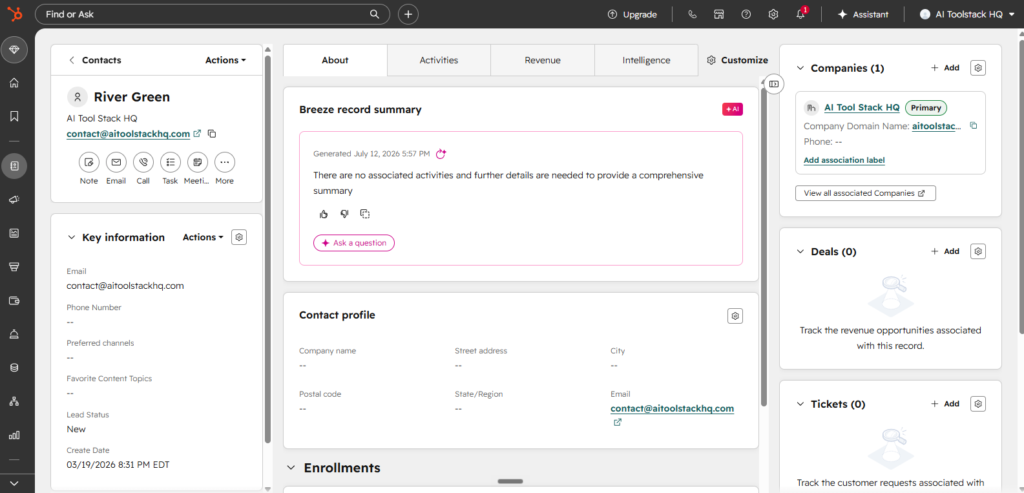
You get storage for up to 1,000 contacts (company records aren’t subject to the same cap), with standard fields plus the ability to create custom properties. Every contact gets a timeline view showing emails, calls, notes, meetings, and deals — all in one place. For a small business that’s been tracking customers in a spreadsheet, this alone is worth signing up for — just plan your upgrade path if your list is approaching four figures.
Deal Pipeline
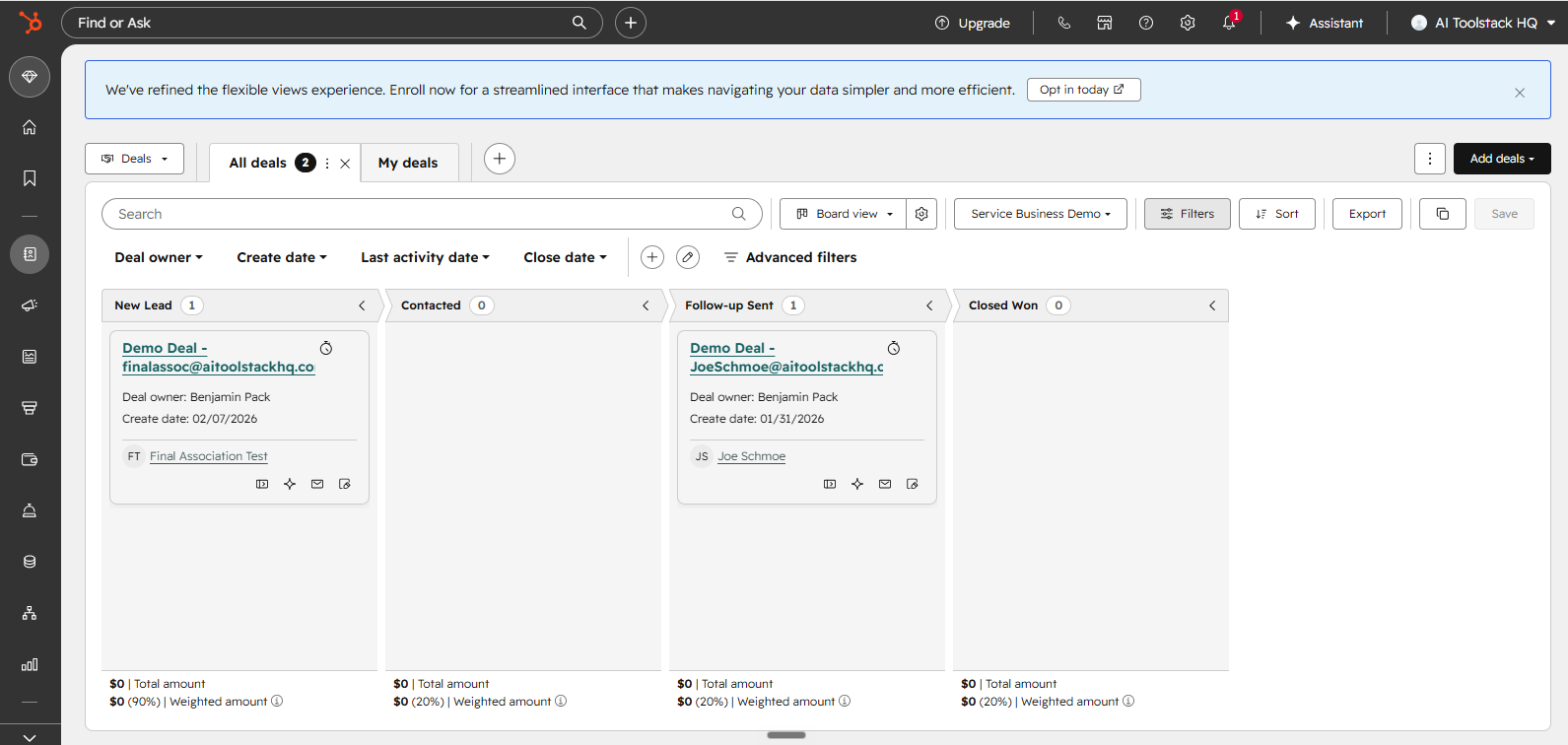
The HubSpot Free CRM includes one deal pipeline with up to seven default stages. You can customize the stage names and add deals manually. You get a Kanban board view and a list view. What you don’t get is multiple pipelines or automated stage transitions — those require paid plans.
Email Integration and Tracking
You can connect Gmail or Outlook and see when contacts open your emails. You get email templates (up to three on the free plan) and can log emails to the CRM automatically. There’s also a basic email send tool directly inside the platform for one-off emails. Bulk email marketing is capped at 2,000 sends per month with HubSpot branding on the free plan.
Meeting Scheduling
HubSpot’s free meeting scheduler is genuinely good. You get one personal meeting link that syncs with your calendar. Contacts can book time without back-and-forth emailing. This is a feature many tools charge for, and HubSpot includes it at zero cost.
Live Chat and Chatbot
You get a live chat widget for your website plus a basic chatbot builder. The chatbot can handle simple routing and FAQ responses. More complex bot logic — conditional branching, advanced routing — is behind a paywall, but the free version handles simple use cases well.
Forms and Landing Pages
The free form builder lets you embed forms on your website that feed directly into your CRM. No coding needed. Landing pages are also included on the free plan — up to 30 pages — though they carry HubSpot branding until you upgrade to Marketing Hub Starter.
Reporting Dashboard
You get 10 pre-built dashboards with up to 50 reports each. You can see deal funnel performance, activity volume, and contact growth. Custom reporting is locked behind Professional tier, but the default reports cover the basics for most early-stage businesses.
Integrations
HubSpot connects with over 1,000 apps through its marketplace, including Gmail, Slack, Zoom, and many more. Most integrations work on the free plan, which is a real advantage. If you’re building out an automation stack, pairing HubSpot with a tool like Make.com can extend its free-tier functionality considerably.
Where HubSpot Free CRM Stops Working For You
Here’s the honest part. The HubSpot Free CRM is deliberately limited in ways that matter as you grow. HubSpot isn’t hiding this — it’s their business model — but you need to understand exactly where the walls are before you build your processes around the free tier.
No Automation on the Free Plan
Workflow automation — the ability to trigger actions based on contact behavior or deal stage changes — is not included in the HubSpot Free CRM. You can’t automatically move deals through stages, send follow-up emails on a schedule, or create tasks based on triggers. This is the single biggest limitation for most small business owners.
Email Sequences Are Paid
Sales sequences — a series of timed emails sent to a prospect — require at least Starter tier. If you’re doing any kind of outbound or nurture email, you’ll hit this wall fast. The free plan only lets you send individual one-off emails or bulk sends with HubSpot branding.
Only One Pipeline
If you manage multiple services, products, or deal types, you’re stuck with one pipeline on the free plan. You can rename stages, but you can’t create a second pipeline without upgrading. Many small businesses need at least two — one for new business, one for renewals or upsells.
HubSpot Branding on Everything
Free emails, forms, chat widgets, and meeting pages carry HubSpot branding. This looks unprofessional for established businesses. Removing it requires upgrading to Starter at minimum.
Limited Reporting Depth
The HubSpot Free CRM gives you pre-built reports, but you can’t build custom reports or dashboards until Professional tier. If you need to slice data by rep, region, deal type, or custom property, you’ll need to upgrade or export to a spreadsheet.
No Document Tracking or Call Recording
Document tracking (seeing when a prospect opens a proposal) and call recording are Sales Hub paid features. Calling from within HubSpot is available on the free plan, but you only get limited minutes and no recording.
Who HubSpot Free CRM Is For
The HubSpot Free CRM is the right fit for a specific type of small business owner. It’s not right for everyone.
It’s ideal for you if:
- You’re currently tracking customers in spreadsheets or email folders and need a structured starting point
- You have a simple sales process with one deal type and a small team (under 5 people)
- You want to test CRM adoption before committing budget
- You’re a freelancer or solopreneur managing a handful of active deals
- You plan to grow into HubSpot’s paid tiers and want to start building your data and habits on the same platform
It’s not right for you if:
- You need any form of sales or marketing automation now
- You run multiple product lines or service categories that need separate pipelines
- You send regular email sequences to prospects
- You need clean, unbranded customer-facing touchpoints
- You’re a growing team that needs reporting beyond surface-level metrics
If you’re already in the market for something with more automation built in from day one, check out the best CRMs for small business breakdown to compare alternatives side by side.
Pros and Cons of HubSpot Free CRM
Pros
- Genuinely free forever — no trial clock, no credit card required, no forced expiration
- Real, functioning CRM — not a stripped demo; contact management, pipeline, and reporting all work out of the box
- Strong UI and UX — one of the cleanest interfaces in the CRM category, with a short learning curve
- Email tracking works well — open and click tracking on individual emails is reliable and useful
- Free meeting scheduler — saves real time and is better than many standalone paid tools
- Extensive integration marketplace — most integrations work on the free plan
- Strong mobile app — iOS and Android apps are genuinely functional, not an afterthought
- Excellent onboarding resources — HubSpot Academy is free and legitimately high quality
Cons
- No automation whatsoever — this is a deal-breaker for many growing businesses
- Only 2 free users — a real constraint, and actually tighter than Zoho’s free tier (3 users)
- Contacts capped at 1,000 — not the “unlimited” or “1,000,000” figure often quoted online; a growing list will hit this fast
- HubSpot branding on all customer-facing tools — unprofessional for established brands
- Only one pipeline — too limiting once your business has more than one deal type
- Paid plans are expensive — the jump from free to Professional is steep, especially per-seat pricing, plus a mandatory $1,500+ onboarding fee
- Email marketing is capped and branded — 2,000 sends/month with HubSpot logo isn’t usable for real campaigns
- Reporting is shallow — pre-built reports only, no custom queries until Professional
- Free plan can feel like a long sales funnel — constant upsell nudges inside the UI once you hit limits
HubSpot Free CRM vs. Competitors
The HubSpot Free CRM doesn’t exist in a vacuum. Here’s how it stacks up against the alternatives most small businesses consider.
| Feature | HubSpot Free | Pipedrive (Lowest Paid) | Zoho CRM Free | monday CRM (Paid) |
|---|---|---|---|---|
| Price to Start | $0 | ~$14/mo/seat (annual billing) | $0 (up to 3 users) | ~$12/mo/seat (annual billing) |
| Free/Entry User Cap | 2 users | ❌ (paid only) | 3 users | ❌ (paid only) |
| Automation on Entry Tier | ❌ | ❌ | ❌ | ❌ |
| Email Sequences | ❌ (paid) | ✅ (paid) | ✅ (paid) | ✅ (paid) |
| Free Meeting Scheduler | ✅ | ✅ (paid add-on) | ❌ | ❌ |
| UI Quality | ⭐⭐⭐⭐⭐ | ⭐⭐⭐⭐⭐ | ⭐⭐⭐ | ⭐⭐⭐⭐ |
| Best For | Starting out, small teams needing pipeline + tracking | Sales-focused small teams | Budget-constrained small teams needing more free seats | Project + CRM hybrid needs |
⚠️ Pricing shown reflects rates at time of publication. SaaS pricing changes frequently — verify current pricing on each tool’s website before committing.
vs. Pipedrive: Pipedrive has no meaningful free tier, but once you’re paying, it’s more focused on pipeline management and less bloated than HubSpot. If you know you’re going to pay, Pipedrive is often a better per-dollar value for sales teams. Read the full Pipedrive review for a detailed breakdown.
vs. Zoho CRM Free: Zoho’s free tier allows one more user than HubSpot’s (3 vs. 2) and has a more complex interface, but has no workflow automation either — that’s gated behind Zoho’s paid Standard tier, same as HubSpot. If your team is tiny and the extra seat matters more than UI polish, Zoho is worth exploring. See the Zoho CRM review for the full picture.
vs. monday CRM: monday CRM doesn’t have a free tier — it’s paid from the start. But it includes automation from entry level and its visual interface is highly flexible. If you need automation built in from day one and budget isn’t a constraint, monday CRM competes well.
vs. GoHighLevel: GoHighLevel is a fundamentally different product — it’s an all-in-one marketing and sales platform built for agencies and businesses that want CRM, automation, email, SMS, funnels, and website hosting under one roof. There’s no free tier, but if you’re ready to pay and want a lot more than just a CRM, it’s worth considering alongside HubSpot’s paid tiers.

How to Get Started with HubSpot Free CRM
Getting started with the HubSpot Free CRM takes less than 10 minutes. Here’s the practical path:
- Create your account — Go to HubSpot’s website and sign up with your business email. The free account is instant, no credit card required.
- Connect your email — Link Gmail or Outlook immediately. This enables email tracking and auto-logging of conversations.
- Import your contacts — Upload a CSV from your existing contacts or spreadsheet. HubSpot’s import tool maps fields well.
- Customize your pipeline — Rename the default deal stages to match your actual sales process. Don’t skip this step — generic stages reduce adoption.
- Set up your meeting link — Connect your calendar and share your booking link. Start using it immediately to replace back-and-forth scheduling.
- Install the browser extension — HubSpot’s Sales Chrome extension adds email tracking to your Gmail inbox and is worth installing on day one.
- Explore HubSpot Academy — Free certifications and training that genuinely improve how you use the platform. The CRM onboarding course takes under two hours.
One practical tip: don’t try to use every free feature at once. Get contact management and pipeline tracking working cleanly first. Add live chat and forms in week two. The HubSpot Free CRM has enough features that trying to configure everything simultaneously leads to abandonment.
Frequently Asked Questions About HubSpot Free CRM
Is HubSpot Free CRM actually free forever?
Yes. The HubSpot Free CRM is permanently free — it’s not a time-limited trial. You won’t be charged automatically or forced to upgrade. HubSpot makes money when you choose to unlock paid features, but the free tier itself has no expiration date and no credit card requirement to sign up.
How many users can use HubSpot Free CRM?
The HubSpot Free CRM supports up to 2 free users — actually tighter than Zoho’s free tier, which allows 3. Additional team members require a paid seat starting at the Starter tier ($20/month). If you’re a true solo operator this won’t matter, but a 3-person founding team will hit this limit immediately.
Can you automate anything in HubSpot Free CRM?
No meaningful automation is available on the HubSpot Free CRM. You can’t set up workflows that trigger actions based on contact behavior, deal stage changes, or form submissions. Basic automation — even a simple follow-up email sequence — requires upgrading to at least the Starter tier. This is the most common reason small business owners upgrade or look elsewhere.
What’s the contact limit on HubSpot Free CRM?
The HubSpot Free CRM caps stored contacts at 1,000. Other record types in your account — deals, companies, tickets — can scale much higher, but the contact limit is the binding constraint for most growing businesses. Once you cross 1,000 contacts, you’ll need to upgrade to keep adding new ones. Your marketing email send limit is a separate cap at 2,000 sends per month.
Does HubSpot Free CRM include email marketing?
It includes limited email marketing — specifically 2,000 email sends per month, with HubSpot branding in the footer. This is enough for very small lists and occasional sends, but not for serious campaigns. If email marketing is a core channel for you, consider pairing the HubSpot Free CRM with a dedicated email tool, or upgrading to Marketing Hub Starter to remove send limits and branding.
Is HubSpot Free CRM good enough for a solopreneur or freelancer?
Yes — for a solopreneur or freelancer managing under 50 active prospects and clients, the HubSpot Free CRM is more than sufficient. The contact timeline, email tracking, meeting scheduler, and single pipeline cover the core needs of independent business owners. You’ll likely never feel the one-pipeline limit, and the free meeting link alone saves meaningful time each week.
What happens when I hit the limits of HubSpot Free CRM?
HubSpot will notify you with in-app prompts when you approach or hit feature limits. You won’t lose your data, but you’ll lose the ability to use certain features until you upgrade. The most common upgrade triggers are: needing a second pipeline, wanting to remove HubSpot branding, needing email sequences, or wanting any form of workflow automation. The HubSpot Free CRM is designed to create exactly these pain points at predictable growth stages.
Verdict: Is HubSpot Free CRM Worth It?
The HubSpot Free CRM is worth it — with a specific caveat. If you’re a small business owner who needs to get organized, replace a spreadsheet, and start tracking deals and contacts in a structured way, it’s the best free option available. The clean interface, meeting scheduler, and email tracking deliver real value at zero cost, even with a tighter user cap (2) and contact limit (1,000) than the “practically unlimited” reputation the free tier has online. Few tools at any price point do contact management and pipeline tracking as cleanly.
But go in clear-eyed about what “free” means here. The HubSpot Free CRM is a deliberately engineered entry point into a paid ecosystem. The walls you’ll hit — no automation, one pipeline, branded emails — aren’t accidents. They’re placed exactly where growing businesses start to feel pain. HubSpot knows this, and the upgrade path from free to Starter to Professional is their entire business model.
If you outgrow it, the paid tiers are legitimately capable — but expensive. Before upgrading, compare the cost against purpose-built alternatives. For sales-focused small teams, ActiveCampaign’s trial offers strong CRM + email automation in one at lower per-seat cost. For visual pipeline management, Pipedrive delivers excellent value. And for teams that want an all-in-one platform with automation from day one, GoHighLevel is worth evaluating before committing to HubSpot’s paid tiers.
For what it is, the HubSpot Free CRM is excellent. Just know where it stops before you build too much on top of it.