Affiliate Disclosure: This article contains affiliate links. If you click through and make a purchase, we may earn a commission at no additional cost to you. We only recommend tools we’ve researched and believe will benefit your small business.
Quick Verdict
Zoho CRM delivers enterprise-grade CRM capabilities at small business pricing. It’s feature-rich, customizable, and affordable, but comes with a steeper learning curve than simpler alternatives. Best for small businesses ready to invest time in setup for long-term scalability. The free plan supports up to 3 users, making it ideal for testing before committing. If you need immediate simplicity, look elsewhere. If you want a CRM that grows with you, Zoho is a solid choice.
Table of Contents
Zoho CRM Review: Can It Actually Work for Small Business?
You’re evaluating CRMs because your current system isn’t cutting it anymore. Maybe you’re stuck in spreadsheets, losing deals to poor follow-up, or drowning in manual data entry. You’ve heard about Zoho CRM because someone mentioned the free plan or the low price point compared to bigger names like Salesforce or HubSpot.
Here’s what you need to know upfront: Zoho CRM isn’t the easiest platform to learn, but it’s one of the most cost-effective ways to access powerful CRM functionality. This zoho crm review cuts through the marketing speak to tell you whether it actually makes sense for your small business.
The platform offers legitimate automation, multichannel communication, AI-powered insights, and integration capabilities that rival systems costing 3-5x more. But those features come wrapped in an interface that requires genuine setup time. You won’t be up and running in 30 minutes like some competitors promise.
The question isn’t whether Zoho CRM has enough features. It does. The question is whether you’re willing to invest the initial learning curve for a system that scales without forcing you to migrate later. The rest of this Zoho CRM review breaks down exactly what you’re getting — and where the platform falls short.
What Is Zoho CRM?
Zoho CRM is a cloud-based customer relationship management platform built by Zoho Corporation, a privately-held software company founded in 1996. Unlike venture-backed startups chasing exits, Zoho bootstrapped its growth and now serves over 250,000 businesses worldwide.
The platform centralizes your customer data, tracks deals through your pipeline, automates follow-up sequences, and provides analytics on your sales performance. It connects email, phone, live chat, and social media into one workspace so you’re not juggling multiple tabs to manage customer interactions.
What sets Zoho apart is its breadth. You get lead scoring, workflow automation, territory management, sales forecasting, custom modules, and integration with 40+ other Zoho products plus hundreds of third-party tools. This isn’t a lightweight CRM pretending to be enterprise-ready—it’s an enterprise platform packaged for smaller budgets.
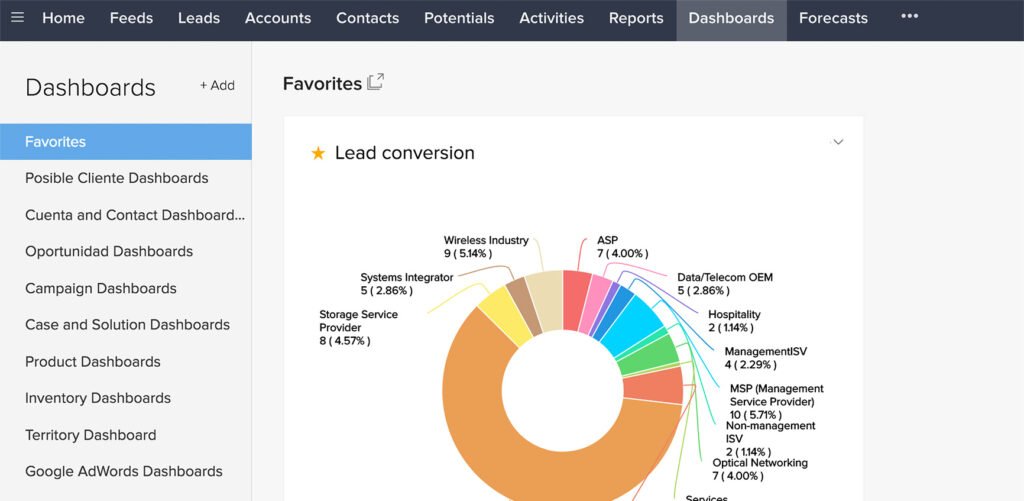
The interface follows traditional CRM layouts: modules for Leads, Contacts, Accounts, Deals, Tasks, and Reports. You navigate via a left sidebar, work within individual records, and customize fields, layouts, and automations through admin settings. It feels familiar if you’ve used any major CRM before, though Zoho’s customization depth exceeds most competitors at this price point.
Zoho CRM runs entirely in your browser with mobile apps for iOS and Android. Everything syncs in real-time across devices. No local software installation required, and updates roll out automatically without disrupting your workflow.
With that foundation covered, here’s what this Zoho CRM review found when we dug into the features that actually matter for small business.
Zoho CRM Review – Pricing Breakdown
Zoho CRM uses per-user monthly pricing with four main tiers. Annual billing cuts costs by roughly 30% compared to monthly payments. All prices below reflect monthly billing:
| Plan | Price per User/Month | Annual Pricing | Key Features |
|---|---|---|---|
| Free | $0 | $0 | Up to 3 users, basic CRM, mobile apps, limited automation |
| Standard | $20 | $14 | Sales forecasting, custom reports, scoring rules, validation rules |
| Professional | $35 | $23 | Workflow automation, inventory management, custom buttons, web forms |
| Enterprise | $50 | $40 | Advanced customization, Zia AI, multi-user portals, territory management |
| Ultimate | $65 | $52 | Feature limits increased, advanced BI, enhanced storage, dedicated support |
⚠️ Pricing shown reflects rates at time of publication. SaaS pricing changes frequently — verify current pricing on each tool’s website before committing.
Most small businesses land on Professional ($35/user/month billed monthly, or $23/user/month billed annually) because that’s where workflow automation unlocks. Standard works if you just need deal tracking and basic reporting without automation. Enterprise becomes worth it when you need Zia AI for predictive analytics or want advanced customization features.
The free plan is legitimately useful for micro-businesses. Three users can manage contacts, track deals, send emails, and use mobile apps. You hit limitations around automation and reporting, but it’s a real CRM, not a crippled trial.
Hidden costs to consider: Zoho charges extra for premium integrations like their Phonebridge service for call recording ($10/user/month). Email insights that show open and click tracking require Professional or higher. Storage limits on lower tiers may force upgrades if you attach many files to records.
Compared to competitors, Zoho undercuts almost everyone. HubSpot’s Professional tier starts at $90/user/month. Salesforce Essentials runs $25/user/month but locks features behind higher tiers. Pipedrive costs $14-$99/user/month depending on the plan. For feature parity, Zoho typically costs 40-60% less.
One pricing advantage: Zoho doesn’t charge extra for multiple pipelines, custom fields, or API access on paid plans. Competitors often gate these behind premium tiers.
Zoho CRM Review: Core Features That Matter
Contact and Deal Management
Zoho CRM organizes data into Leads, Contacts, Accounts, and Deals. Leads are potential customers you haven’t qualified yet. Once qualified, you convert them into Contacts (people), Accounts (companies), and Deals (sales opportunities). This structure follows standard CRM conventions.
Each record type supports custom fields, so you can track whatever matters to your business—project types, service preferences, contract renewal dates, customer segments. Custom fields don’t require coding. You add them through point-and-click configuration.
Deal tracking uses visual pipeline views where you drag deals between stages. You set up your stages (Prospecting, Proposal, Negotiation, Closed Won, etc.) and assign probability percentages to each. Zoho calculates weighted forecasts based on deal values and stage probabilities.
Related records link automatically. When you convert a Lead, Zoho creates the Contact, Account, and Deal, then connects them. Click into any Deal to see the associated Contact and Account without searching. Email history, notes, tasks, and attachments all appear on record detail pages.
Email Integration and Tracking
Zoho CRM connects to Gmail, Outlook, Exchange, and custom email providers. Once connected, you send and receive emails directly inside the CRM. Emails automatically attach to the relevant Contact or Lead record based on the recipient address.
Email tracking on Professional tier and above shows when recipients open emails and click links. You get desktop notifications when tracked emails are opened, giving you timing intel for follow-ups.
Mass email campaigns support up to 2,000 recipients per blast on Professional, scaling to 15,000 on Ultimate. You create templates with merge fields, schedule sends, and track open rates and click-throughs. It’s not full marketing automation like ActiveCampaign, but it handles basic email campaigns without needing a separate tool.
SalesInbox consolidates emails from multiple accounts into one unified inbox inside Zoho CRM. You see customer context alongside messages—deal status, recent activities, notes—without switching screens. It’s cleaner than toggling between your email client and CRM.
Workflow Automation
Workflow automation unlocks on Professional tier. You build “if this, then that” rules using a visual builder. When a Lead reaches a certain score, assign it to a sales rep. When a Deal moves to Negotiation stage, create a follow-up task for three days later. When a Contact hasn’t been touched in 30 days, send an automated check-in email.
Zoho supports time-based and action-based triggers. Action-based workflows fire immediately when conditions are met (new Lead created, Deal amount changed). Time-based workflows execute on schedules (every Monday, 7 days after Deal creation).
Actions include: send email, create task, update field, send webhook, call custom function. You chain multiple actions in sequence, so one trigger can execute several steps. The visual builder shows workflow logic clearly, making complex automations manageable without coding. Workflow automation is one of the strongest findings in this Zoho CRM review — at $35/user/month or $23 billed annually, you’re getting automation depth that competitors charge significantly more for.
Blueprint feature on Enterprise tier creates guided selling processes. You define the exact steps reps must complete before advancing a Deal to the next stage—attach proposal document, get manager approval, schedule demo call. Reps can’t skip steps, ensuring process consistency across your team.
Zia AI Assistant
Zia is Zoho’s AI layer, available on Enterprise tier and above. It predicts deal success probability based on historical patterns, suggests best times to contact leads based on past engagement, and detects anomalies in your sales data.
Zia scans emails and suggests responses, creates tasks from email requests automatically, and answers natural language questions about your data. Ask “Show me deals closing this month over $10,000” and Zia returns the results.
Lead enrichment through Zia pulls company data from public sources when you add a new Lead. You get company size, industry, social profiles, and news mentions without manual research. It’s not perfect—data quality depends on what’s publicly available—but it saves research time on every new prospect.
Sentiment analysis evaluates email tone to flag unhappy customers. If a client’s email language turns negative, Zia alerts you to potential churn risk. Again, not perfect, but adds a monitoring layer you wouldn’t have manually.
Reporting and Analytics
Zoho CRM includes pre-built reports for common metrics: deals by stage, revenue by rep, lead sources, conversion rates, activity summaries. You run reports on-demand or schedule automatic delivery to your inbox.
Custom reports let you slice data however you need. Drag fields into rows and columns, apply filters, choose chart types (bar, pie, line, funnel). The report builder requires some learning but gives you flexibility competitors charge premium prices for.
Dashboards compile multiple reports and charts on one screen. You create different dashboards for different roles—sales overview for reps, pipeline forecast for managers, activity metrics for team leads. Dashboards auto-refresh so you see current data without manual updates.
Advanced analytics on Ultimate tier adds cohort analysis, funnel visualization, and comparative reports showing period-over-period changes. Most small businesses won’t need this depth immediately, but it’s available as you scale.
Mobile Apps
Zoho CRM’s mobile apps for iOS and Android provide nearly full CRM functionality on phones and tablets. You access contacts, log calls, update deals, check in to meetings, and scan business cards that auto-populate into Lead records.
Offline mode lets you view and edit records without internet connection. Changes sync automatically when you reconnect. Useful for field sales teams working in areas with spotty coverage.
The mobile interface simplifies navigation compared to desktop but doesn’t dummy down features. You can still run reports, set up workflows (on Professional+), and manage custom modules from your phone. Not ideal for complex configuration work, but fine for daily CRM tasks.
Integrations
Zoho CRM integrates natively with 40+ other Zoho apps—Zoho Books for accounting, Zoho Desk for support tickets, Zoho Campaigns for marketing automation, Zoho Sign for e-signatures. If you’re building a Zoho ecosystem, everything connects seamlessly.
Third-party integrations include Google Workspace, Microsoft 365, Mailchimp, QuickBooks, Slack, Zapier, Trello, and hundreds more through Zoho Marketplace. Quality varies by integration—some are deep two-way syncs, others just push data one direction.
API access on all paid plans lets developers build custom connections. REST API documentation is thorough. If you have technical resources, you can connect Zoho CRM to virtually anything.
Make.com works particularly well with Zoho CRM for building advanced automations without code. You can trigger workflows across multiple apps when CRM data changes, creating sophisticated automation sequences. For more on automation, check out our article on how to automate customer follow-up.
Who Zoho CRM Is For
One of the central questions this Zoho CRM review set out to answer is who this platform actually suits. It fits small businesses meeting these criteria::
You have at least one person willing to own setup. Someone needs to invest 10-20 hours learning the platform, configuring fields, building workflows, and training the team. If everyone expects plug-and-play simplicity, frustration awaits. If you have a team member who enjoys figuring out systems, Zoho rewards that investment.
You plan to stay with your CRM for years. The setup time makes sense when you’re building a long-term system. If you might switch platforms in 12 months, simpler alternatives like Pipedrive make more sense despite higher per-user costs.
Your processes will evolve. Zoho’s customization depth shines when your needs change. As you add services, enter new markets, or refine your sales process, you reconfigure Zoho rather than hitting platform limitations. Businesses with stable, simple processes don’t need this flexibility.
You’re price-sensitive but need real power. If budget is tight but you need automation, custom fields, and solid reporting, Zoho delivers more capability per dollar than anyone else. You’re trading setup time for cost savings.
You work across multiple channels. If you contact customers via email, phone, live chat, and social media, Zoho’s multichannel workspace prevents context-switching. Everything lives in one place rather than scattered across tools.
Zoho works well for: professional services firms, B2B sales teams, agencies, consultancies, real estate teams, wholesale distributors, and SaaS companies in early growth stages.
Zoho is wrong if you need absolute simplicity, can’t invest initial setup time, or want a CRM that holds your hand with extensive onboarding support. It’s also wrong if you need deep native integrations with niche industry software—Zoho covers common tools well but won’t connect to everything.
Zoho CRM Review – Pros and Cons
What Zoho CRM Does Well
Pricing that actually works for small budgets. At $35/user/month (or $23 billed annually) for Professional (where most businesses land), you get workflow automation, custom reporting, and inventory management for less than competitors charge for basic CRM. The free plan for three users is genuinely functional, not a trial disguised as free.
Customization depth without coding. You build custom modules, add fields, create workflows, design page layouts, and set validation rules through configuration rather than code. This means business users can adapt the system as needs change without calling developers.
Scales without forcing migration. Zoho handles three-person teams and 100-person sales departments on the same platform. You don’t outgrow it and face the nightmare of migrating to enterprise software later. The system you learn at five users still works at 50.
Multichannel communication in one workspace. Email, phone, chat, and social interactions all attach to customer records automatically. You see complete conversation history without switching between tools. Context is always available.
Strong mobile apps. Full CRM functionality on phones and tablets with offline mode. Field teams can work effectively from mobile devices, not just view data but actually update records, log activities, and manage deals.
No artificial limits on basic features. Multiple pipelines, custom fields, API access, and webhooks are included on paid plans, not charged as add-ons. Competitors often gate these behind premium tiers or usage fees.
Where Zoho CRM Falls Short
Learning curve is real. Plan on weeks, not hours, to become proficient. The interface isn’t intuitive for first-time CRM users. You’ll reference documentation frequently during setup. This isn’t a criticism of quality—Zoho is well-built—but it demands patience.
Support quality varies. Community forums are helpful. Documentation is thorough. But getting personalized support, especially on lower tiers, can be slow. Enterprise and Ultimate tiers get better support, but Standard and Professional users often rely on self-service resources.
Interface feels dated. Zoho’s UI works but looks behind modern SaaS standards. It’s functional over flashy. If visual polish matters to your team adoption, sleeker competitors will feel more contemporary.
Integration quality is inconsistent. Native Zoho app integrations are excellent. Third-party integrations range from seamless to buggy. Check specific integration reviews before assuming your critical tools will connect smoothly.
Marketing automation is basic. Email campaigns work for simple blasts but lack the sophistication of dedicated marketing platforms. If you need complex drip sequences, behavioral triggers, and detailed funnel analytics, you’ll still need a tool like ActiveCampaign alongside Zoho.
Page load speeds can lag. With heavy customization and large datasets, page loads sometimes slow. Not unusable, but noticeable compared to competitors built on newer infrastructure. This improves as Zoho invests in platform updates, but it’s a current reality.
Zoho CRM vs Competitors
Any Zoho CRM Review would be incomplete without looking at its competitors to assess the best tool for your business. check out our article on the best CRM for small business for more information.

Zoho CRM vs HubSpot CRM: HubSpot’s free CRM is more intuitive and easier to start with. But HubSpot’s pricing explodes quickly. Their Professional tier runs $90/user/month versus Zoho’s $35/month (or $23 billed annually). HubSpot wins on interface polish and inbound marketing features. Zoho wins on price, customization, and workflow automation depth. Choose HubSpot if you prioritize ease over cost. Choose Zoho if you need more features per dollar and can handle setup complexity.
Zoho CRM vs Pipedrive: Pipedrive focuses on visual pipeline management with minimal clutter. It’s simpler to learn but less customizable. Pipedrive runs $14-$99/user/month depending on features. Zoho offers more automation, better reporting, and broader integration options at comparable or lower prices. Choose Pipedrive if you want dead-simple deal tracking. Choose Zoho if you need a complete business system. Check out our full Pipedrive Review.
Zoho CRM vs Salesforce: Salesforce is the enterprise standard with unmatched ecosystem and customization. But starting at $25/user/month, Salesforce quickly scales to $150-$300/user/month for features comparable to Zoho Professional or Enterprise. Zoho provides 70-80% of Salesforce functionality at 20-30% of the cost. Choose Salesforce if you need absolute cutting-edge features and have budget. Choose Zoho if you need enterprise capabilities without enterprise pricing.
Zoho CRM vs monday.com CRM: monday CRM offers visual boards and extreme flexibility but lacks some traditional CRM features like built-in email tracking and sales-specific automation. monday pricing starts at $12/user/month but quickly increases with CRM features. monday wins on visual appeal and project management crossover. Zoho wins on dedicated CRM functionality. Choose monday if you need work management plus CRM in one visual tool. Choose Zoho for traditional CRM power. For more information about monday.com, check out our monday CRM Review.

Zoho CRM vs GoHighLevel: GoHighLevel combines CRM, marketing automation, website builder, and client communication tools specifically for agencies. At $97-$297/month for unlimited users, GoHighLevel wins for agencies needing all-in-one client management. Zoho wins for businesses needing just CRM and standard business tools. GoHighLevel’s strength is agency-specific workflow; Zoho’s strength is broader business applicability. Still need more information, check out our GoHighLevel Review.
How to Get Started with Zoho CRM
If this Zoho CRM review has you ready to move forward, here’s how to get started without wasting the first two weeks on setup mistakes.
Step 1: Start with the free plan. Sign up at Zoho.com/crm and select the free plan. Invite your initial team (maximum three users). Spend a week using basic features—add contacts, create deals, send emails. Get comfortable with navigation before customizing anything.
Step 2: Map your sales process. Before touching configuration, document your actual sales stages on paper. What steps do deals go through from first contact to closed? What information do you need to track? What repetitive tasks could be automated? Clear process documentation prevents configuration chaos.
Step 3: Configure one module at a time. Start with Leads or Deals—whichever you’ll use most. Add custom fields for information you track. Remove fields you don’t need. Customize the page layout so critical fields are prominent. Don’t try to configure everything at once.
Step 4: Connect your email. Link your email account through Settings → Channels → Email. Configure SalesInbox if you want unified inbox functionality. Test sending and receiving emails through Zoho to ensure proper record association.
Step 5: Import existing data. Export contacts and deals from your current system (spreadsheets, old CRM, email contacts). Clean the data—remove duplicates, standardize formatting. Use Zoho’s import wizard to upload CSV files. Map columns to Zoho fields carefully. Import in small batches first to test before loading everything.
Step 6: Build one workflow. Upgrade to Professional tier when you’re ready for automation. Create one simple workflow—maybe “assign new leads to sales rep” or “create follow-up task when deal moves to negotiation.” Test it thoroughly before building more complex automation.
Step 7: Set up essential reports. Create dashboards showing deals by stage, revenue forecasts, and activity summaries. Schedule weekly reports to your inbox. Make data visibility automatic so you don’t have to remember to check.
Step 8: Train your team incrementally. Don’t dump everything on users at once. Start with basic record creation and email sending. Add automation and reporting training after they’re comfortable with fundamentals. Record short video walkthroughs for common tasks.
Expect this process to take 3-4 weeks if you’re configuring part-time. Rushing leads to poor setup that requires rebuilding later. Initial time investment pays off with a system tailored to how you actually work.
FAQs For Zoho CRM Review
Is Zoho CRM really free or is there a catch?
The free plan is genuinely free for up to three users with no time limit. You get core CRM functionality—contact management, deal tracking, basic reports, mobile apps, email integration. The catches are limited automation (only five workflow rules), basic customization, and no phone support. For micro-businesses not needing advanced features, it’s legitimately usable long-term. Zoho uses the free tier to get users into their ecosystem, hoping you’ll upgrade or adopt other Zoho products. An important distinction in the Zoho CRM Review, the free CRM itself isn’t crippled or trial-disguised-as-free.
How hard is Zoho CRM to learn compared to other CRMs?
Zoho CRM has a steeper learning curve than simplified alternatives like Pipedrive or HubSpot’s free CRM. Expect 10-20 hours to become comfortable with basic functions and 30-40 hours to master customization and automation. The interface isn’t intuitive for first-time CRM users—you’ll reference documentation frequently. However, Zoho is easier than Salesforce while offering comparable power. The learning investment pays off with a system you won’t outgrow. Any Zoho CRM Review would be incomplete without addressing onboarding complexity. If you need to be productive in your CRM within days, not weeks, simpler alternatives make more sense.
Can Zoho CRM handle both B2B and B2C businesses?
Yes, though Zoho CRM leans toward B2B workflows by default. The Leads → Contacts → Accounts → Deals structure maps naturally to B2B sales cycles. For B2C, you’d primarily use Contacts and Deals, treating individual customers as Contacts rather than separating Accounts. Customization flexibility lets you adapt Zoho for B2C—add fields for purchase history, loyalty status, service preferences. Zoho’s integration with Zoho Campaigns helps B2C businesses manage larger contact lists. Bottom line: Zoho works for B2C but requires more configuration to feel natural compared to B2B usage.
Does Zoho CRM integrate with QuickBooks and other accounting software?
Yes, Zoho CRM integrates with QuickBooks Online through Zoho’s marketplace. The integration syncs customers, invoices, and payments between systems. Zoho also connects to Xero, FreshBooks, and natively integrates with Zoho Books if you’re using Zoho’s accounting product. Integration depth varies—some sync bidirectionally, others push data one direction. Check the specific integration’s documentation before assuming it covers your exact use case. For custom accounting software, you can use Zoho’s API or tools like Make.com to build connections.
What happens to my data if I stop paying for Zoho CRM?
If you cancel a paid plan, Zoho downgrades you to the free plan if you have three or fewer users. Your data remains accessible, but you lose premium features like advanced automation and extra storage. If you have more than three users, you must export your data before cancellation or reduce to three users. Zoho provides data export tools—you can download all records as CSV files. Your data isn’t held hostage, but you’re responsible for exporting before full cancellation. Zoho retains data for a limited period after cancellation, but don’t rely on this—export immediately when you decide to leave.
Can I use Zoho CRM without adopting other Zoho products?
Absolutely. Zoho CRM works independently. You’re not forced into Zoho Books, Zoho Campaigns, or any other Zoho product. Many businesses use Zoho CRM with Gmail, Microsoft 365, Mailchimp, and other non-Zoho tools. That said, if you eventually need related functions like marketing automation, help desk, or accounting, staying in the Zoho ecosystem provides tighter integration than piecing together multiple vendors. But there’s no requirement—use Zoho CRM standalone if it solves your customer management needs.
How does Zoho CRM pricing compare when you factor in add-ons?
Any Zoho CRM Review would be incomplete without talking about the real cost after add-ons. Base Zoho pricing is transparent, but certain features cost extra. Phonebridge for call recording adds $10/user/month. Additional storage beyond plan limits costs $6/GB/month. Premium integrations through Zoho Marketplace sometimes charge separately. Despite add-ons, total cost typically remains below competitors. For example, a five-person team on Professional ($35/user/month = $175/month billed monthly, or $23/user/month = $115/month billed annually) plus Phonebridge ($50/month) totals $225/month or $165/month billed annually. Comparable functionality on Salesforce or HubSpot easily exceeds $500/month. Factor in potential add-on costs, but Zoho still delivers cost advantage for most configurations.
Zoho CRM Review – Final Verdict
Zoho CRM earns its reputation as the best value in CRM software. At $35/user/month (or $23 billed annually) for Professional tier, you get enterprise-level features — workflow automation, custom reporting, multichannel communication, mobile apps, and extensive integrations — for a fraction of what competitors charge. The free plan for three users is legitimately functional, not a trial in disguise.
The trade-off this Zoho CRM review keeps coming back to is real: Zoho demands setup time and patience. You won’t be fully productive in a week. The interface requires learning. Documentation becomes required reading, not optional reference. But this investment pays dividends. You build a CRM system tailored to your business that scales without forcing expensive migration later.
If this Zoho CRM review has convinced you of anything, let it be this: the platform’s value proposition is genuine, but only if you match its requirements. You need someone willing to own the setup, a sales process complex enough to justify the configuration work, and a long enough time horizon to recoup the learning investment. Check those boxes and Zoho is hard to beat at this price point.
If you can’t check those boxes — if you need your team productive in days, not weeks, or if your sales process is straightforward — simpler tools serve you better. Pipedrive is the cleanest alternative for deal-focused teams that want pipeline visibility without the complexity. And if you’re running a service business that needs CRM, marketing automation, and client communication in one place, GoHighLevel is worth a serious look — it’s built specifically for that use case.
For everyone else: start with the free plan, give it a real 30-day test with actual data, and upgrade to Professional when you’re ready to add automation. Zoho rewards the businesses willing to meet it halfway.